Samsung Convection Oven How To Use A Complete Guide
The Samsung convection oven how to use guide covers everything from basic setup to advanced cooking techniques. This article walks you through every setting, tip, and trick to get the most out of your appliance. Whether you are a beginner or a seasoned cook, you will find practical advice that makes Samsung convection oven cooking easy and fun.
Key Takeaways
- Convection cooking uses a fan to circulate hot air, which cooks food faster and more evenly than a regular oven.
- Always reduce cooking temperature by 25°F when using the convection mode for best results.
- Proper rack placement matters a lot. Center racks give the most even cooking, while upper racks help with browning.
- Avoid overcrowding the oven. Leave space between pans so air can flow freely around each dish.
- Use low-sided baking sheets and light-colored pans for better browning and crisping.
- Preheat your Samsung convection oven every time. This ensures consistent cooking from the moment food goes in.
- Clean the fan and interior regularly to maintain performance and extend the life of your oven.
📑 Table of Contents
- Samsung Convection Oven How To Use: A Complete Guide
- Understanding Your Samsung Convection Oven
- Setting Up Your Samsung Convection Oven for the First Time
- Samsung Convection Oven How To Use: Step-by-Step Guide
- Best Foods To Cook in a Samsung Convection Oven
- Convection Oven Tips and Tricks for Better Results
- Common Mistakes To Avoid
- Cleaning and Maintaining Your Samsung Convection Oven
- Conclusion
Samsung Convection Oven How To Use: A Complete Guide
So you just got a Samsung convection oven, and you are not sure where to start. Maybe the buttons look confusing, or you have seen recipes that say “use convection mode” but you are not exactly sure what that means. You are not alone. A lot of home cooks feel the same way when they first use a convection oven. But here is the good news. Once you understand the basics, using your Samsung convection oven becomes second nature. This guide will walk you through everything you need to know. From setup to cooking to cleaning, we have got you covered. By the end, you will feel confident and excited to try new recipes.
A convection oven is different from a regular oven. It has a fan and a heating element that work together to spread hot air all around the food. This means your meals cook faster and more evenly. You get golden crusts on bread, crispy skin on chicken, and perfectly roasted vegetables every time. The Samsung convection oven how to use process is simpler than you might think. Let us break it down step by step.
Understanding Your Samsung Convection Oven
What Makes a Convection Oven Different
A regular oven heats food from the bottom up. Hot air rises, but it does not move around much. This can create hot spots. Some parts of your dish get too hot while others stay cool. A convection oven fixes this problem. The fan blows hot air continuously over and around the food. This is called even heat distribution. The result? Food cooks more uniformly. You also get a nice browning and crisping effect on the outside while keeping the inside moist.
The fan in a fan-forced oven also helps reduce cook time. Most recipes for a regular oven need about 25 percent less time in a convection setting. This makes your kitchen more energy efficient. You save gas or electricity, and your food comes out better too.
Key Parts of Your Samsung Convection Oven
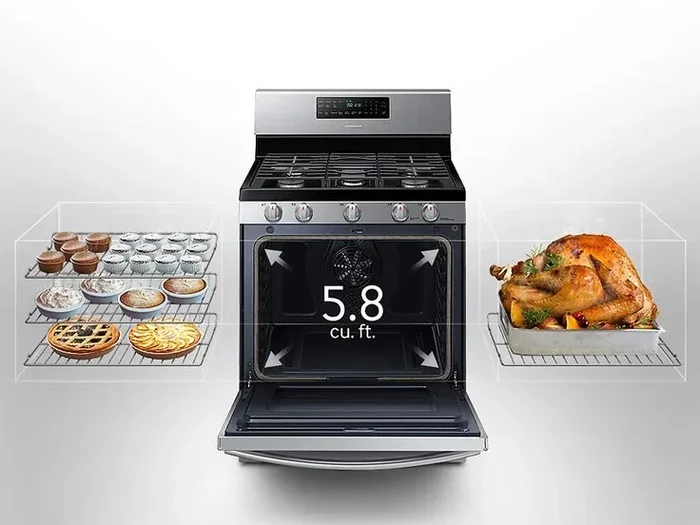
Before you start cooking, it helps to know the main parts of your oven. Here is a quick rundown:
- Fan: This circulates hot air inside the oven cavity.
- Heating elements: These are usually at the top and bottom. They generate the heat.
- Oven racks: These hold your pans and dishes. You can adjust them to different heights.
- Control panel: This is where you set the temperature, cooking mode, and time.
- Interior light: Lets you check on your food without opening the door.
- Convection fan cover: Located at the back. It houses the fan mechanism.
Knowing these parts helps you troubleshoot small issues. It also makes you more comfortable experimenting with different Samsung oven settings.
Setting Up Your Samsung Convection Oven for the First Time
Unboxing and Placement
When you first bring your oven home, take it out of the box carefully. Remove any packaging materials or stickers inside the oven cavity. Wipe the interior with a soft, damp cloth. Do not use harsh chemicals. Just warm water and mild soap work fine. Place the oven on a flat, stable surface. Make sure there is enough space around it for ventilation. Most ovens need at least a few inches of clearance on all sides.
First-Time Temperature Calibration
Some Samsung convection ovens come pre-calibrated. But it is still a good idea to check the temperature accuracy. You can buy a simple oven thermometer from any kitchen store. Place it inside the oven and heat it to 350°F. Compare the thermometer reading with the oven display. If there is a big difference, you may need to adjust your cooking temperatures. Most Samsung oven manuals have a calibration section that walks you through this process.
Samsung Convection Oven How To Use: Step-by-Step Guide
Now let us get to the heart of the matter. Here is a simple, clear walkthrough of how to use your Samsung convection oven for everyday cooking.
Choosing the Right Cooking Mode
Most Samsung convection ovens offer several cooking modes. Each mode serves a different purpose:
- Convection Bake: Uses the fan with bottom heat. Great for cookies, cakes, and bread.
- Convection Roast: Uses the fan with top and bottom heat. Perfect for meats and large dishes.
- Convection Broil: Uses the fan with top heat only. Ideal for browning and finishing dishes.
- Regular Bake: No fan. Works like a traditional oven for delicate items.
- Air Fry: A newer Samsung feature that mimics deep frying with hot air circulation.
For most recipes, convection bake or convection roast will be your go-to modes. Start with these two and explore from there.
Setting the Temperature and Time
Here is an important rule for baking with convection. Always lower the temperature by 25°F compared to what a regular oven recipe calls for. For example, if a recipe says 375°F for a regular oven, set your Samsung convection oven to 350°F. The fan makes the heat more intense, so the lower temperature prevents burning.
As for time, reduce the cooking time by about 25 percent. Keep an eye on your food. Use the oven light to check progress without opening the door. Opening the door lets heat escape and can affect cooking results.
Using the Fan and Heat Settings
The fan speed on some Samsung models can be adjusted. A low fan setting works well for delicate baked goods like soufflés. A high fan setting is great for roasting vegetables or meats that need a crispy exterior. If your model has a multi-rack baking option, use it when cooking several trays at once. The fan helps distribute heat across all racks evenly.
| Cooking Mode | Best For | Temp Adjustment | Time Adjustment |
|---|---|---|---|
| Convection Bake | Cakes, cookies, bread | Reduce by 25°F | Reduce by 25% |
| Convection Roast | Meats, poultry, casseroles | Reduce by 25°F | Reduce by 25% |
| Convection Broil | Browning, finishing dishes | No change needed | Watch closely |
| Air Fry | Frozen foods, snacks | Follow preset | Follow preset |
| Regular Bake | Delicate items | No change needed | No change needed |
Best Foods To Cook in a Samsung Convection Oven
One of the best things about a convection oven is its versatility. You can cook a wide range of dishes with excellent results. Here are some of the best foods to try.
Roasting Meats and Poultry
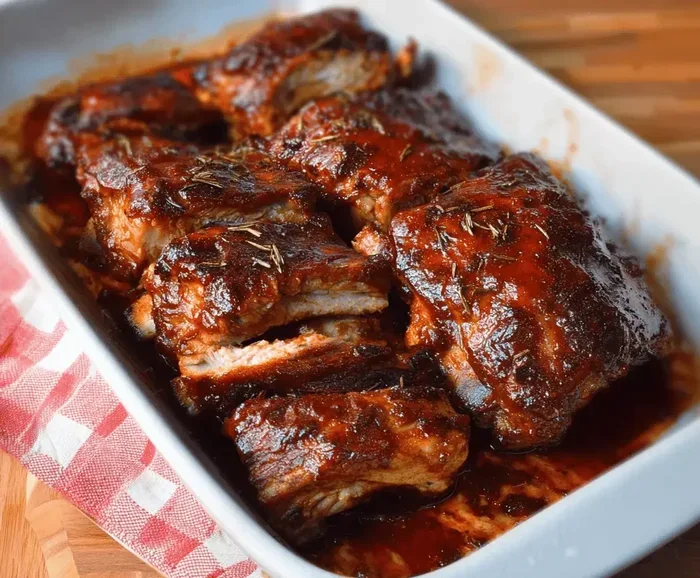
Roasting chicken in a convection oven is a game changer. The circulating hot air crisps the skin beautifully while keeping the meat juicy inside. A whole chicken at 375°F (convection setting) typically takes about 15 minutes per pound. Use a meat thermometer to check that the internal temperature reaches 165°F in the thickest part of the thigh.
You can also roast beef, pork, or lamb with great results. The even heat distribution means no more rotating your roast halfway through. For a delicious main dish, you might want to try How To Cook Stuffed Rouladen In The Oven for a classic recipe that works beautifully with convection heat.
Baking Bread and Pastries
If you love fresh bread, a Samsung convection oven will become your best friend. The consistent heat helps dough rise evenly and creates a beautiful golden crust. For pastries like croissants or puff pastry, the fan helps create those flaky, buttery layers. Just be careful with very delicate items. Some light pastries may need the regular bake mode without the fan to prevent them from shifting.
Roasting Vegetables and Casseroles
Roasted vegetables come out amazing in a convection oven. The hot air circulates around every piece, giving you crispy edges and tender centers. Toss your veggies with olive oil, salt, and pepper. Spread them in a single layer on a low-sided baking sheet. Roast at 400°F for about 25 to 30 minutes. Stir once halfway through for even cooking.
Casseroles also do well in convection mode. The even heat prevents the common problem of a burnt top and cold bottom. Just cover the casserole with foil for the first half of cooking, then remove the foil to brown the top.
Exploring Different Cuisines
A convection oven opens up a world of culinary exploration. You can try baking flatbreads, making homemade pizzas, or even preparing dishes from different cultures. For those who love adventurous cooking, you might enjoy learning How To Make A Tandoori Oven for another exciting way to use your oven for traditional recipes from around the world.
Convection Oven Tips and Tricks for Better Results
Adjusting Recipes for Convection Cooking
Converting regular oven recipes for convection cooking is easy. Follow these simple rules:
- Lower the temperature by 25°F.
- Reduce the cooking time by 25 percent.
- Check food early. Start checking a few minutes before the original recipe suggests.
- Use shallow pans. Low-sided baking sheets allow air to flow around food better.
- Avoid dark or non-stick pans. They absorb more heat and can cause over-browning. Light-colored aluminum pans work best.
Rack Placement for Even Cooking
Where you place your oven racks makes a big difference. Here are some guidelines:
- Center rack: This is the best spot for most baking and roasting. Heat circulates evenly here.
- Upper rack: Great for browning the top of casseroles or gratins. Move dishes here for the last few minutes of cooking.
- Lower rack: Use this for pizzas or dishes that need a crispy bottom.
- Multiple racks: When baking several trays at once, rotate them halfway through for even results.
Quick Tips for Everyday Use
- Always preheat your convection oven before placing food inside.
- Do not cover the back wall with foil. It blocks the fan and affects airflow.
- Use the oven light to check on food instead of opening the door.
- Let hot pans cool on a stove burner or trivet, not directly on the oven rack.
- For air frying with your Samsung oven, use the preset air fry mode for best results.
Expert Insight: Getting the Most From Your Samsung Convection Oven
Professional chefs who use convection ovens swear by a few key practices. First, they always let the oven fully preheat. This takes about 10 to 15 minutes but makes a noticeable difference in cooking results. Second, they avoid opening the door too often. Every time you open it, you lose heat and disrupt the airflow. Third, they invest in good quality bakeware. Thin, warped pans create uneven cooking. Sturdy, light-colored pans give the best results.
Another expert tip is to keep a cooking log. Write down what you cooked, the temperature, the time, and the results. Over time, you will build a personal reference guide for your specific Samsung convection oven. This is especially helpful when trying new recipes.
Common Mistakes To Avoid
Overcrowding the Oven
This is the number one mistake people make with convection ovens. When you pack too many dishes or pans into the oven, you block the airflow. The fan cannot circulate hot air properly. This leads to uneven cooking and longer cook times. Leave at least a few inches of space between pans and between pans and the oven walls. If you need to cook a lot of food at once, consider doing it in batches.
Forgetting to Adjust Time and Temperature
Using regular oven temperatures and times in a convection oven will lead to overcooked or burnt food. Always remember to reduce temperature by 25°F and reduce time by about 25 percent. These adjustments are not optional. They are essential for getting great results every time.
Using the Wrong Bakeware
Not all bakeware works well in a convection oven. Dark, heavy pans absorb too much heat and can scorch your food. Glass pans take longer to heat up and may not brown the bottom of your dish as well. Stick with light-colored aluminum or steel pans for the best results. If you must use glass, reduce the temperature an extra 5°F.
Ignoring Safety
Safety should always come first. Never put items in your oven that are not oven-safe. For common questions about what is safe to put in your oven, check out this guide on Is It Safe To Put Pizza Box In Oven. It covers important safety tips that apply to any oven, not just Samsung models.
Cleaning and Maintaining Your Samsung Convection Oven
Keeping your Samsung convection oven clean helps it perform at its best. A clean oven also lasts longer and cooks more efficiently. Here is how to care for your appliance.
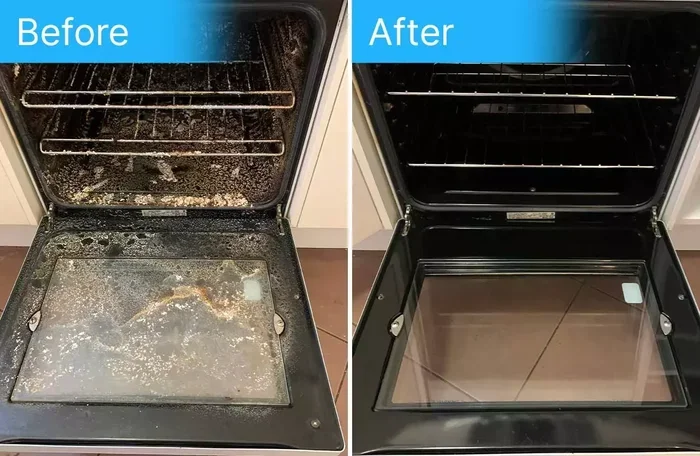
Wipe up spills as soon as the oven cools down. Baked-on grease and food residue become much harder to clean over time. For the interior, use a mild oven cleaner or a paste of baking soda and water. Apply it, let it sit for 15 to 20 minutes, then wipe it away with a damp cloth.
Pay special attention to the fan area at the back of the oven. Food debris can accumulate around the fan and affect its performance. Remove the fan cover if your model allows it, and clean it gently. Also, clean the oven racks separately. Soak them in warm soapy water, then scrub off any residue with a soft sponge.
For the exterior, a simple wipe with a damp cloth keeps it looking new. Avoid abrasive cleaners on the control panel or the door glass. Use a glass cleaner specifically designed for appliance surfaces for the best shine.
Regular maintenance goes a long way. Check the door seal for any gaps or cracks. A worn seal lets heat escape and reduces efficiency. Replace the seal if you notice any damage. Also, descale the oven if you live in a hard water area. Mineral buildup can affect heating elements over time.
Conclusion
Using your Samsung convection oven does not have to be intimidating. With the right knowledge and a little practice, you will be cooking delicious meals with ease. Remember the key rules. Reduce temperature by 25°F, cut cooking time by 25 percent, and always preheat the oven. Choose the right cooking mode for each dish. Use light-colored pans and avoid overcrowding. Keep your oven clean and well-maintained.
The Samsung convection oven how to use process is straightforward once you understand the basics. From roasting meats to baking bread to making crispy roasted vegetables, your convection oven opens up a world of cooking possibilities. Start with simple recipes, build your confidence, and soon you will be experimenting with more complex dishes. Your convection oven is a powerful tool. Use it well, and it will reward you with delicious meals for years to come.
Frequently Asked Questions
What is the difference between convection bake and regular bake on a Samsung oven?
Convection bake uses a fan to circulate hot air around the food, while regular bake relies only on the heating elements without fan assistance. The fan in convection mode cooks food faster and more evenly, which is why you need to lower the temperature and reduce the cooking time when using it.
Can I use metal pans in my Samsung convection oven?
Yes, you can use metal pans in a Samsung convection oven. In fact, light-colored aluminum pans are recommended because they reflect heat and promote even browning. Avoid dark or non-stick pans, as they absorb more heat and can cause food to burn faster in convection mode.
How long does it take to preheat a Samsung convection oven?
Most Samsung convection ovens preheat to 350°F in about 5 to 10 minutes. The exact time depends on your model and the target temperature. Always wait for the preheat signal or indicator light before placing food inside for the best cooking results.
What temperature should I set my Samsung convection oven to for roasting chicken?
For roasting chicken in a Samsung convection oven, set the temperature to 375°F on the convection roast mode. A whole chicken typically takes about 15 minutes per pound. Always use a meat thermometer to ensure the internal temperature reaches 165°F in the thickest part of the thigh.
Is it safe to put foil in a Samsung convection oven?
You can use foil in a Samsung convection oven, but with caution. Do not cover the back wall or block the fan area, as this restricts airflow and affects cooking performance. Use foil to line pans or cover dishes loosely, but never let it touch the heating elements or obstruct the fan.
How do I convert a regular oven recipe for use with a Samsung convection oven?
To convert a regular oven recipe for convection cooking, reduce the temperature by 25°F and cut the cooking time by about 25 percent. Start checking your food a few minutes earlier than the original recipe suggests. Keep notes on your conversions so you can repeat successful results in the future.