How To Turn Off Oster Toaster Oven Quickly And Safely
Knowing how to turn off Oster toaster oven properly keeps your kitchen safe and your appliance running smoothly. Whether you have a digital model or a manual dial, this guide walks you through every method with clear, easy steps. You will also learn common mistakes, safety tips, and troubleshooting advice to handle any situation confidently.
You just pulled your food out of the Oster toaster oven, and now the question hits you. How do you actually turn it off? It sounds simple, right? But if you have ever stood in front of a glowing digital display or a stubborn dial, you know it is not always obvious. Whether you are a first-time owner or have had your Oster toaster oven for years, understanding the shut-off process matters. A wrong move could lead to wasted energy, uneven cooking, or even a safety hazard. This guide covers everything you need to know about how to turn off Oster toaster oven models quickly and safely. We will walk through every method, fix common problems, and share tips that make the whole process a breeze.
Let us be honest. Most of us do not read the manual. We plug in the appliance, use it, and move on. But taking a few extra minutes to understand your Oster toaster oven controls can save you a lot of headaches. You will feel more confident in the kitchen, and your appliance will last longer. So let us dive into the simple steps for powering down your oven the right way.
Key Takeaways
- Multiple Ways to Power Off: Every Oster toaster oven has a simple shut-off method, whether it uses a digital display, timer dial, or manual controls.
- Safety Comes First: Always let the oven cool before cleaning, and never leave it unattended during the shut-off process.
- Reset Is Your Friend: A quick reset can fix most issues when your Oster oven does not respond to the normal shut-off method.
- Know Your Model: Different Oster models have slightly different controls, so check your user manual for model-specific instructions.
- Prevent Problems: Regular cleaning and proper use reduce the chance of your toaster oven sticking or not turning off.
- Call a Pro When Needed: If basic steps fail, it is time to contact Oster support or a qualified technician.
📑 Table of Contents
Understanding Your Oster Toaster Oven Controls
Before you learn how to turn off Oster toaster oven units, you need to understand what controls you are working with. Oster makes several models, and each one has a slightly different layout. The good news is that most follow a similar logic. Once you know the basics, you can handle any model with ease.
Digital Control Panels
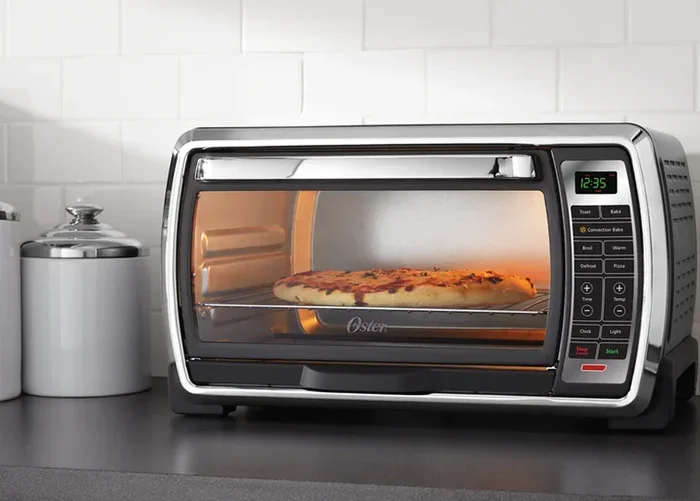
Newer Oster toaster oven models come with digital touch pads or button panels. These usually include a power button, a timer, temperature settings, and mode selectors. The digital display gives you clear feedback about what your oven is doing. When you want to shut it down, you typically press the power button or the cancel button. Some models also respond to a long press of the start button.
Digital controls are straightforward, but they can sometimes freeze or lag. If your Oster digital controls are not responding, do not panic. We will cover reset methods later in this guide.
Manual Dial Controls
Older or simpler Oster models use a mechanical dial. You rotate the dial to select your temperature and cooking mode. To turn the oven off, you simply rotate the dial back to the off position. This is usually marked with an “OFF” label or a zero symbol. Manual dials are reliable and rarely cause confusion, but they can stick if food debris builds up around the dial mechanism.
Slider and Touchpad Combinations
Some mid-range Oster toaster ovens use a combination of sliders and touch-sensitive buttons. You slide to set the temperature and tap to choose the cooking mode. The shut-off process for these models usually involves tapping the cancel or off icon on the screen. These hybrid controls offer the best of both worlds but require a bit more attention during operation.
Step-by-Step: How To Turn Off Oster Toaster Oven
Now that you understand the basic controls, let us get into the actual steps. How to turn off Oster toaster oven depends on the type of model you own, but the process is always simple. Follow these steps carefully for a safe and effective shut-off every time.
Step 1: Stop the Cooking Cycle
First, stop the current cooking cycle. If your oven is using a timer, press the timer button or adjust the dial to zero. For digital models, tap the cancel button. This tells the oven to stop heating immediately. Your food will not continue to cook, and the heating elements will begin to cool down.
Step 2: Switch to Off Mode
Next, switch the oven to the off mode. On digital models, press the power button. On dial models, rotate the knob to the OFF marker. On slider-touchpad models, tap the power icon. You should see the display go dark or the indicator light turn off. This confirms that the oven is no longer drawing power for heating.
Step 3: Unplug the Oven (Optional but Recommended)
Here is a tip many people overlook. After you learn how to turn off Oster toaster oven, consider unplugging it when not in use. This is not required, but it adds an extra layer of safety. Unplugging prevents phantom power draw and protects your oven from electrical surges. It also keeps curious little hands safe in busy households.
Step 4: Let It Cool
Never touch the interior or exterior of the oven right after shutting it off. The heating elements remain hot for several minutes. Place the oven door slightly ajar to let heat escape. Once the oven is cool to the touch, you can safely clean it or store it away.
Quick Tips for Shutting Down Your Oster Toaster Oven
- Always use the off button or dial rather than just waiting for the timer to run out. This prevents unnecessary energy use.
- Keep the area around the oven clear of flammable items like paper towels or plastic wraps before and after cooking.
- Wipe down the interior after each use to prevent grease buildup that can cause smoke or odors during the next session.
- Check the power cord regularly for fraying or damage. A damaged cord is a safety risk even when the oven is off.
- Use oven mitts when handling the oven door or interior racks immediately after cooking.
Common Problems When Your Oster Toaster Oven Won’t Turn Off
Sometimes things do not go as planned. You press the button, turn the dial, but the Oster toaster oven keeps running. This is frustrating, but it is also fixable. Let us look at the most common reasons your oven might not shut off and what you can do about each one.
The Timer Keeps Running
If your timer is stuck and will not reset, the issue is usually mechanical. Food debris or grease can get into the dial mechanism and cause it to stick. Try cleaning around the dial with a damp cloth. If that does not work, the timer motor may need replacement. Contact Oster support for a replacement part or professional repair.
The Digital Display Stays On
A digital display that remains lit after you press the power button usually means the oven is in standby mode rather than fully off. Try holding the power button for three to five seconds. If the display still does not turn off, unplug the oven for thirty seconds and plug it back in. This forces a full reset of the digital controls.
The Heating Element Stays Hot
This is the most concerning issue. If the heating elements remain hot long after you have turned the oven off, the thermostat or relay switch may be malfunctioning. Do not use the oven in this condition. Unplug it immediately and contact a professional technician. A faulty thermostat can become a serious fire hazard if ignored.
The Oven Door Stuck Open
Some Oster models have a door lock feature that activates during self-cleaning cycles. If your door is stuck after cooking, try pressing the cancel button and then gently pulling the door handle. If it still will not budge, wait ten minutes for the lock to release. Never force the door open, as this can damage the locking mechanism.
The Oven Does Not Respond to Any Button
If none of the buttons work, the control board may have failed. This can happen due to a power surge or age. Unplug the oven, wait two minutes, and plug it back in. If it still does not respond, you may need a control board replacement. Check your warranty before ordering parts.
Safety Tips for Turning Off Your Toaster Oven
Safety should always come first when operating any kitchen appliance. Learning how to turn off Oster toaster oven safely protects your home, your family, and your investment. Here are the most important safety practices to follow every time you shut down your oven.
Never Leave a Running Oven Unattended
It is tempting to walk away while your Oster toaster oven is cooking, especially during short tasks. But accidents happen fast. A crumb on the heating element can ignite, or a timer malfunction can cause overheating. Stay in the kitchen while your oven is on, and always turn it off the moment you are done.
Keep Flammable Items Away
Paper towels, oven mitts, plastic containers, and wooden utensils should never be placed near a hot toaster oven. Even after you turn the oven off, residual heat can ignite these materials. Keep your counter space clear around the oven at all times.
Use the Auto Shut-Off Feature
Many modern Oster models include an auto shut-off feature that powers down the oven after a set period. Check your user manual to see if your model has this setting. Enable it for extra peace of mind, especially if you tend to get distracted while cooking.
Regular Maintenance Prevents Hazards
A clean oven is a safe oven. Grease and food particles inside the oven can smoke or even catch fire at high temperatures. Clean the interior after every few uses, and wipe down the exterior weekly. Check the crumb tray and empty it regularly. This simple habit goes a long way toward preventing oven fires.
Know Your Electrical Limits
Oster toaster ovens draw a significant amount of power. Avoid plugging other high-wattage appliances into the same outlet. Overloaded circuits can trip breakers, cause sparks, or even start electrical fires. If you use your oven frequently, consider having a dedicated outlet installed by an electrician.
Expert Tips for Using Your Oster Toaster Oven
Beyond just shutting it down, there are many ways to get the best performance from your Oster toaster oven. These expert tips will help you cook better, save energy, and extend the life of your appliance.
Preheat for Better Results
Always preheat your oven before placing food inside. This ensures even cooking and better browning. Most Oster models reach the target temperature within three to five minutes. Use the preheat indicator light or beep as your cue to add your food.
Use the Right Rack Position
The position of the rack affects how your food cooks. For broiling, place the rack close to the top element. For baking, use the middle position. For toasting, the bottom rack works best. Getting the rack position right can cut your cooking time and improve results significantly.
Do Not Overcrowd the Tray
It is tempting to fit as much food as possible on the tray, but overcrowding blocks airflow. This leads to uneven cooking and longer cook times. Leave space between items so hot air can circulate freely. Your food will cook faster and more evenly as a result.
Experiment With Convection Cooking
If your Oster model has a convection setting, use it. Convection fans circulate hot air around the food, which reduces cooking time by up to 25 percent. It also promotes even browning. Just remember to lower the temperature by about 25 degrees Fahrenheit when using convection mode.
Clean the Glass Door Regularly
A dirty glass door makes it hard to monitor your food without opening the oven and losing heat. Wipe the interior glass with a damp cloth and a mild cleaner after each use. For tough grease spots, use a paste of baking soda and water. A clean door lets you watch your food cook without any guesswork.
When to Seek Professional Help
Most issues with turning off your Oster toaster oven can be solved with the steps above. But some problems require professional attention. If you have tried resetting the oven, cleaning the controls, and checking the power supply, and the oven still will not turn off, it is time to call for help. Persistent electrical issues, unusual smells, or visible damage to the cord or plug are all red flags. Do not attempt to repair electrical components yourself. Contact Oster customer support or a licensed appliance technician for safe and proper repairs.
Keeping your warranty information handy is also a good idea. Many Oster toaster ovens come with a one-year limited warranty that covers parts and labor for manufacturing defects. If your oven is still under warranty, professional repairs may be free or discounted. Check your receipt or register your product on the Oster website to confirm your warranty status.
Comparing Oster Toaster Oven Models and Their Shut-Off Methods
Different Oster models have different shut-off mechanisms. Here is a quick comparison of popular models to help you understand what to expect.
- Oster TSSTTVDGXL: Digital touch controls with a dedicated power button and cancel function. Press power to shut off.
- Oster TSSTTVWHBL: Dial controls with an off marker on the knob. Rotate to OFF to power down.
- Oster TOB-260XL: Combination slider and touchpad. Tap the power icon or hold the cancel button.
- Oster TSSTTVDGZ: Digital controls with auto shut-off feature. Press power or let the timer expire.
As you can see, how to turn off Oster toaster oven varies slightly by model, but the core process remains the same. Stop the cooking cycle, switch to off, and unplug if desired. Once you know your specific model, the process becomes second nature.
Key Takeaways
- Know Your Controls: Whether digital, dial, or hybrid, every Oster model has a clear shut-off method. Familiarize yourself with your specific controls.
- Follow the Steps: Stop the cycle, switch to off, and unplug for maximum safety. These three simple steps work for every model.
- Troubleshoot Common Issues: Sticky dials, frozen displays, and hot elements all have simple fixes. Reset, clean, and contact support when needed.
- Practice Safety Habits: Never leave the oven unattended, keep flammable items away, and clean regularly to prevent hazards.
- Maintain Your Oven: Regular cleaning and proper use extend the life of your appliance and keep it running efficiently.
- Call a Pro When Needed: Persistent electrical issues or physical damage require professional attention. Do not attempt DIY electrical repairs.
Learning how to turn off Oster toaster oven properly is one of the simplest yet most important skills you can develop. It keeps your kitchen safe, your food cooking perfectly, and your appliance working for years to come. Whether you own a basic model with a manual dial or a high-end digital version, the shut-off process is always within reach. Take a moment today to review your oven’s controls and practice the steps outlined in this guide. You will feel more confident, more prepared, and more in control every time you use your Oster toaster oven. Safe cooking starts with safe shut-down, and now you have everything you need to do it right.
Frequently Asked Questions
How do I turn off my Oster toaster oven if the buttons are not working?
Try unplugging the oven from the wall outlet and waiting at least two minutes before plugging it back in. This forces a full system reset. If the buttons still do not work after resetting, contact Oster customer support for further assistance or consider a professional inspection of the control board.
Can I turn off my Oster toaster oven by just turning the dial to zero?
Yes, for models with a manual dial, rotating the knob to the OFF or zero position will shut off the oven. Make sure you feel or hear a click confirming the dial has engaged the off position. If the oven still heats after turning to zero, the dial mechanism may need cleaning or replacement.
Is it safe to leave my Oster toaster oven plugged in when not in use?
It is generally safe to leave it plugged in, but unplugging it when not in use adds an extra layer of safety. This prevents phantom energy drain and protects against electrical surges. If you have young children or pets, unplugging the oven is a smart precaution.
Why does my Oster toaster oven stay on after I press the off button?
This usually happens when the control board has frozen or the oven is in standby mode. Hold the power button for five seconds to force a full shut-off. If that does not work, unplug the oven for thirty seconds and then plug it back in. Persistent issues may indicate a faulty control board that needs replacement.
Do all Oster toaster ovens have an auto shut-off feature?
Most modern Oster models include an auto shut-off feature, but older or basic models may not. Check your user manual or the product specifications on the Oster website to confirm. If your model has this feature, enable it for added safety and convenience.
What should I do if the heating element stays hot after turning off the oven?
Unplug the oven immediately and do not use it until the element cools completely. A hot element that will not turn off usually signals a faulty thermostat or relay switch. Contact Oster support or a licensed technician to inspect and repair the issue. Do not attempt to fix electrical components yourself.