How To Use Toshiba Microwave Oven The Complete Guide
This complete guide teaches you everything you need to know about using your Toshiba microwave oven. You will learn how to set up the appliance, understand the controls, use each cooking function, and get the best results every time. Whether you are a beginner or just want to sharpen your skills, this guide covers it all.
Microwaves are a staple in almost every kitchen. They save time, make cooking easier, and handle everyday tasks like reheating leftovers in minutes. If you just bought a Toshiba microwave oven or have had one for a while but want to use it better, you are in the right place.
This guide breaks down everything you need to know about how to use Toshiba microwave oven models. We cover setup, controls, cooking functions, and pro tips that make a real difference. By the end, you will feel confident using every feature your microwave has to offer. Let us get started!
Key Takeaways
- Easy Setup: Learning how to set up your Toshiba microwave is quick and simple with our step-by-step instructions.
- Master the Controls: Understanding the buttons and settings helps you cook with confidence and precision.
- Multiple Cooking Functions: Your Toshiba microwave offers defrost, reheat, sensor cooking, and more for everyday meals.
- Best Results: Using the right power levels and timing makes a big difference in how your food turns out.
- Troubleshooting Help: We cover common issues so you can fix them fast without calling a technician.
- Cleaning Tips: Keeping your Toshiba microwave clean extends its life and keeps your food tasting fresh.
📑 Table of Contents
- Getting to Know Your Toshiba Microwave Oven
- Setting Up Your Toshiba Microwave for the First Time
- Understanding the Controls and Settings
- Common Cooking Functions and How to Use Them
- Tips for Best Cooking Results
- Troubleshooting Common Issues
- Cleaning and Maintenance Tips
- Frequently Asked Questions
- Conclusion
Getting to Know Your Toshiba Microwave Oven
Before you press any buttons, it helps to understand what makes a Toshiba microwave different from other brands. Toshiba microwaves come with smart features like sensor cooking, inverter technology, and multiple power levels. These features give you more control over how your food cooks.
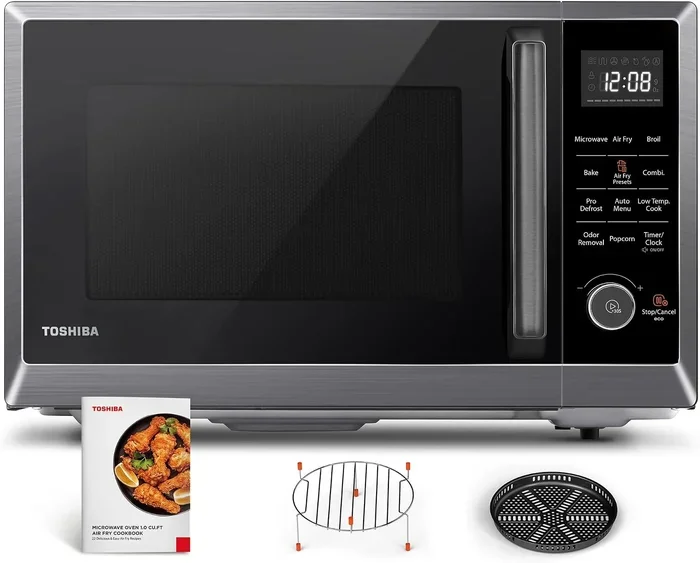
Most Toshiba models include a turntable, a control panel with preset buttons, and a digital display. The turntable spins your food evenly so it heats without cold spots. The control panel might look busy at first, but it is designed to be simple once you learn what each button does.
Know Your Model
Toshiba makes several microwave types. Some are Toshiba convection microwaves that combine microwave energy with a heating element for baking and grilling. Others are basic countertop models perfect for everyday use. Check the model number on the back or inside the door to find your specific features.
Knowing your model helps you understand which buttons and settings apply to your unit. You can always find the user manual on the Toshiba website if you need more details. The manual also lists safety warnings and warranty information.
Setting Up Your Toshiba Microwave for the First Time
Setting up a new Toshiba microwave oven is straightforward. You do not need special tools or technical skills. Follow these simple steps to get started.
- Unbox the microwave carefully. Remove all packaging materials, tape, and plastic wraps from inside the cavity.
- Place it on a flat, stable surface. Make sure there is space around the vents for proper airflow.
- Plug it into a grounded outlet. Avoid using extension cords or power strips for safety.
- Turn it on and run a test cycle. Place a cup of water inside and heat it on high for one minute. This removes any manufacturing residue and confirms the unit works.
- Wipe down the interior. Use a damp cloth to clean the walls, ceiling, and turntable after the test run.
Placement Matters
Where you place your microwave affects how well it works. Keep it away from walls and other appliances that block ventilation. The top and sides need at least a few inches of clearance. Also, avoid placing it near a stove or direct sunlight, as heat can affect performance.
If your model comes with a mounting kit, you can install it under a cabinet to save counter space. Just follow the included instructions carefully. A secure mount keeps the microwave stable and safe during daily use.
Understanding the Controls and Settings
The control panel is the brain of your Toshiba microwave. Learning what each button does is the key to using it well. Most panels include a combination of numbered buttons, preset modes, and function keys.
Power Level Button
The power level button lets you choose how much energy the microwave uses. Higher power means faster cooking. Lower power is better for gentle heating or defrosting. Most Toshiba microwave settings range from 1 to 10, with 10 being the highest wattage.
For example, you might use power level 8 for cooking vegetables quickly. Use power level 3 for slowly warming soup without boiling it. Understanding this simple setting changes how your food turns out every time.
Timer and Clock
The timer and clock buttons help you track cooking time. You can also use the timer independently as a kitchen clock. Setting the clock is usually as simple as pressing the clock button and entering the time with the number pad.
Preset Cooking Modes
Many Toshiba models include preset modes like popcorn, beverage, pizza, and potato. These modes automatically set the right power level and time for specific foods. You just place the food inside, press the preset button, and the microwave does the rest.
These presets are great for quick meals and snacks. They take the guesswork out of cooking and help beginners feel more confident in the kitchen.
Common Cooking Functions and How to Use Them
Your Toshiba microwave oven can do much more than just reheat leftovers. Here are the most common cooking functions and how to get the best results from each one.
Reheating Food
Reheating is one of the most frequent uses for any microwave. Place your food in a microwave-safe dish and cover it loosely with a microwave-safe lid or paper towel. This traps steam and heats food evenly.
Use medium power (level 5 or 6) for most reheating tasks. Start with 1 to 2 minutes and check the food. Stir or flip halfway through to avoid hot and cold spots. For a single plate of leftovers, 2 to 3 minutes on medium power usually works perfectly.
Defrosting Food
The defrost function is a lifesaver when you forget to take meat out of the freezer. Most Toshiba microwave models have a dedicated defrost button. You enter the weight of the food, and the microwave adjusts the time and power automatically.
Always use the defrost setting rather than high power. High power can start cooking the edges while the center stays frozen. Check the food halfway through and separate pieces if needed for even thawing.
Cooking Fresh Food
You can actually cook full meals in a Toshiba convection microwave. Use the convection mode for baking, roasting, and grilling. The built-in heating element circulates hot air, giving you crispy results similar to a traditional oven.
For simple meals, try microwave-safe recipes like scrambled eggs, steamed vegetables, or baked potatoes. Start with recommended times and adjust based on your microwave’s wattage. Higher wattage models cook faster, so keep an eye on your food the first few times.
Sensor Cooking
Advanced Toshiba models include sensor cooking technology. The sensors detect steam and humidity from the food and automatically adjust the time and power level. This feature is excellent for rice, soups, and stews.
To use sensor cooking, add the recommended amount of water, press the sensor cook button, and let the microwave do the work. It takes the guesswork out of timing and helps prevent overcooking.
Quick Tips for Better Results
- Always use microwave-safe containers. Avoid metal, aluminum foil, and certain plastics.
- Stir or rotate food halfway through cooking for even heating.
- Let food rest for a minute after cooking to allow heat to distribute evenly.
- Use a microwave-safe cover to trap steam and cook food faster.
- Arrange food in a ring shape rather than stacking it for more uniform heating.
Tips for Best Cooking Results
Getting the most out of your Toshiba microwave comes down to a few simple habits. These tips help you cook better food and avoid common mistakes.
Use the Right Wattage
Every microwave has a different wattage, usually between 700 and 1200 watts. Higher wattage microwaves cook faster. If you are following a recipe written for a different wattage, adjust the time accordingly. A 1000-watt microwave will cook faster than a 700-watt model.
Cover Your Food
Covering food with a microwave-safe lid or damp paper towel traps steam. This speeds up cooking and keeps food moist. It also prevents splatters inside the microwave cavity, making cleanup easier.
Season After Cooking
Flavors can change during microwave cooking. It is best to add salt, pepper, and spices after the food is cooked. This gives you better control over the taste and prevents over-seasoning.
Let Food Rest
After removing food from the microwave, let it sit for a minute or two. The heat continues to distribute throughout the dish. This simple step prevents burns and improves the texture of your food.
Common Mistakes to Avoid
- Using non-microwave-safe containers. This can damage the microwave or release harmful chemicals into your food.
- Overheating liquids. Water and other liquids can superheat and boil explosively when disturbed. Heat liquids in short intervals and stir before drinking.
- Running the microwave empty. This can damage the magnetron, the component that generates microwave energy. Always put something inside before running it.
- Ignoring the turntable. The turntable ensures even cooking. Do not operate the microwave without it in place.
Troubleshooting Common Issues
Even the best Toshiba microwave oven can have occasional issues. Most problems have simple solutions you can handle yourself.
Microwave Not Turning On
If your microwave does not turn on, first check the power cord and outlet. Make sure the door is fully closed, as microwaves have a safety switch that prevents operation when the door is open. Some models also have a child lock feature that needs to be disabled.
Food Not Heating Evenly
Uneven heating often happens when the turntable is not spinning properly. Check that the turntable and the roller ring are seated correctly. If the problem continues, you may need to clean the waveguide cover inside the microwave. Grease and food buildup on this cover can block microwave energy distribution.
Strange Noises During Operation
A gentle humming sound is normal during operation. Loud buzzing or grinding noises may indicate a problem with the turntable motor or the cooling fan. Stop the microwave and check for obstructions. If the noise continues, contact Toshiba customer support for assistance.
Smells or Smoke
If you notice smells or smoke, stop the microwave immediately. Unplug it and check for burned food inside. Wipe the interior with a damp cloth. If the smell persists, there may be an electrical issue that requires professional inspection.
Cleaning and Maintenance Tips
Keeping your Toshiba microwave clean helps it perform better and last longer. A clean microwave also keeps your food tasting fresh and prevents odors.
Daily Cleaning
Wipe down the interior after each use with a damp cloth. This prevents food buildup and makes deep cleaning easier. Always unplug the microwave before cleaning the inside.
Deep Cleaning
For tough stains and odors, try the steam cleaning method. Place a bowl of water with lemon slices inside the microwave. Heat on high for 3 to 5 minutes. The steam loosens grime and leaves a fresh scent. Then simply wipe the interior with a cloth.
Remove the turntable and wash it separately with warm soapy water. The roller ring and waveguide cover should also be cleaned regularly. Check your user manual for specific guidance on cleaning each part of your model.
Exterior Care
Wipe the exterior with a soft damp cloth. Avoid using harsh chemicals or abrasive scrubbers that can scratch the surface. Keep the vents clear of dust and debris to ensure proper airflow.
Frequently Asked Questions
How do I set the clock on my Toshiba microwave?
Press the clock button on the control panel. Use the number pad to enter the current time and press the clock button again to confirm. Refer to your specific model’s manual if this method does not work, as some Toshiba microwaves have a slightly different setup process.
Can I use metal containers in my Toshiba microwave?
No, you should never use metal containers or aluminum foil in a microwave. Metal reflects microwave energy and can cause sparking, which may damage the appliance or start a fire. Always use microwave-safe glass, ceramic, or plastic containers labeled as microwave-safe.
What is the difference between a Toshiba microwave and a Toshiba convection microwave?
A standard Toshiba microwave uses microwave energy to heat food quickly. A Toshiba convection microwave adds a heating element and fan that circulates hot air, allowing you to bake, roast, and grill food. Convection microwaves offer more cooking versatility but take slightly longer for certain tasks.
How do I defrost meat quickly and safely?
Use the defrost button on your Toshiba microwave and enter the weight of the meat. The microwave automatically sets the right power level and time. Check the meat halfway through and separate any pieces that are touching to ensure even thawing. Cook the meat immediately after defrosting for best food safety results.
Why does my Toshiba microwave stop mid-cooking?
This can happen if the thermal fuse trips due to overheating or if the door is not fully closed. Check that nothing is blocking the door from closing properly. If the issue continues, the microwave may need professional repair. Avoid running the microwave empty, as this is a common cause of fuse trips.
How often should I clean my Toshiba microwave?
You should wipe the interior after every use to prevent food buildup. A deeper clean with steam once a week keeps the microwave fresh and odor-free. Clean the exterior and turntable as needed, typically every one to two weeks depending on how often you use the appliance.
Conclusion
Using your Toshiba microwave oven does not have to be complicated. With the right knowledge, you can unlock every feature and get excellent results every day. From setting up the unit to mastering preset modes, defrosting, and sensor cooking, this guide gives you everything you need to succeed.
Remember to follow safety guidelines, use microwave-safe containers, and keep your appliance clean for the best performance. The more you use your Toshiba microwave, the more comfortable you will become with its controls and functions. Start with the basics and gradually explore the advanced features as you grow more confident.
Now you know how to use Toshiba microwave oven like a pro. Put these tips into practice and enjoy faster, better cooking every time. Your Toshiba microwave is a powerful kitchen tool, and with this guide, you are ready to make the most of it.