Learn How To Turn On Sabbath Mode On Your Ge Oven
Turning on Sabbath Mode on your GE oven is quick and easy once you know the right steps. This guide explains exactly how to activate the feature, what it changes, and how to safely adjust the temperature during Shabbat. You’ll also find troubleshooting tips and expert advice to keep your cooking routine smooth.
Using your GE oven during Shabbat should feel natural, not stressful. The Sabbath Mode feature is designed to let you heat food, keep dishes warm, and follow your religious traditions without touching electronic controls that are restricted on the day of rest. Whether you own a sleek GE Profile range or a reliable built-in GE oven, the process is simpler than you might think. This guide walks you through every step, from turning the mode on to adjusting the temperature safely. You’ll also learn what changes when the mode is active, how to fix common problems, and expert tips that make Sabbath cooking a breeze.
Many people wonder if their kitchen appliance supports this special setting. The answer is yes for most modern GE ovens and ranges. Sabbath Mode goes by another name too—some families call it Shabbat mode or a holiday mode. No matter the term, the purpose is the same: to disable electronic signals that violate Sabbath rules while still letting you use the oven for hot holding and cooking. Below, you’ll find clear instructions, a helpful comparison table, and answers to the questions people ask most often.
Key Takeaways
- Activation Steps: Learn the exact button sequence to turn on Sabbath Mode on touchpad, dial, and button-controlled GE ovens.
- Feature Changes: Discover which electronic functions are disabled, such as the oven light, audible alerts, and digital display.
- Temperature Adjustment: Understand how to raise or lower the oven temperature without turning the oven on or off during Shabbat.
- Troubleshooting: Find quick fixes if Sabbath Mode won’t activate or if the display remains active.
- Safety First: Get expert tips on avoiding common mistakes and keeping your oven running reliably during religious observances.
- Model Differences: See a comparison table that shows how Sabbath Mode works across popular GE and GE Profile ranges.
- Long-Term Care: Learn how regular maintenance helps your oven’s Sabbath Mode feature work flawlessly every time.
📑 Table of Contents
What Is Sabbath Mode on a GE Oven?
Why Is It Called Shabbat Mode?
The name Shabbat mode comes from the Jewish day of rest. During Shabbat and certain holidays, observant families avoid actions that create or change electrical circuits. A standard oven has lights, buzzers, and digital displays that turn on or off when you press a button. Sabbath Mode disables those electronic triggers. It locks out the control panel so you cannot accidentally turn the oven on or off. The heating element still works, but you interact with the oven in a way that respects religious cooking laws. This thoughtful design lets families enjoy warm meals and keep food hot without breaking tradition.
Which GE Ovens Have This Feature?
Most GE ovens sold in the last decade include Sabbath Mode. You’ll find it on GE Profile models, standard built-in ovens, and slide-in ranges. Some older or budget models may not have it, so it’s always good to check your owner’s manual. Look for a label that says “Sabbath Mode” or “Shabbat Mode” on the control panel. If you see it, your oven is ready. If not, you can sometimes add a module or contact GE appliance support to confirm your model’s capabilities. The feature is especially common in ranges sold in areas with large observant communities.
How To Turn On Sabbath Mode on Your GE Oven
Step-by-Step Instructions for Touchpad Models
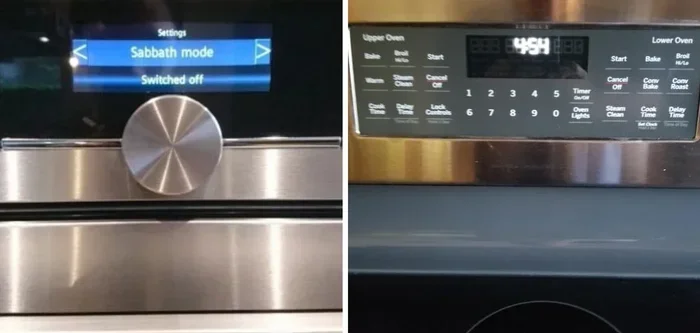
Touchpad GE ovens are the most common in modern kitchens. The process to activate Sabbath Mode is quick and straightforward. Follow these simple steps:
- Make sure the oven is off and cool. The control panel should be in standby mode with no lights blinking.
- Press and hold the Bake button and the Broil button at the same time for three seconds.
- You will hear a short beep, and the display will show “SF” or “Sabbath” to confirm the mode is on.
- Release the buttons. The oven light will turn off, and the digital display will dim or go blank.
- To exit the mode, repeat the same button hold. The display will light up again.
This method works on most GE Profile touchpad ranges. If your oven has a different button layout, try holding the Clock and Bake buttons instead. The control panel layout varies slightly by model, but the principle is the same: a specific combination of two buttons triggers the holiday mode.
Steps for Dial and Button Controls
Older GE ovens or models with a rotary dial use a slightly different sequence. Here’s what to do:
- Turn the oven off. Wait for the digital display to go dark.
- Press and hold the Oven Light button and the Temperature Up arrow for five seconds.
- The display will show a Sabbath icon or the letters “SBD.”
- Release the buttons. The oven light will shut off, and the audible alert will be silenced.
- To turn the mode off, hold the same two buttons again.
If you own a GE built-in oven with a simple dial and no digital display, look for a small switch on the back or side of the control panel. Flipping that switch activates Sabbath Mode. Always unplug the oven before accessing the back panel, or have a qualified technician handle it.
Quick Reference Table for Different GE Models
Not sure which steps apply to your oven? Use this table as a quick guide. It covers the most popular GE and GE Profile series.
| Oven Type | Control Style | Activation Steps | Exit Steps |
|---|---|---|---|
| GE Profile Electric Range | Touchpad | Hold Bake + Broil for 3 sec | Hold Bake + Broil for 3 sec |
| GE Classic Electric Range | Touchpad | Hold Clock + Bake for 5 sec | Hold Clock + Bake for 5 sec |
| GE Gas Range (dial controls) | Dial + Buttons | Hold Oven Light + Temp Up for 5 sec | Hold Oven Light + Temp Up for 5 sec |
| GE Built-In Wall Oven | Switch | Flip Sabbath switch on back panel | Flip switch back to Off |
| GE Slide-In Range | Touchpad | Hold Bake + Broil for 3 sec | Hold Bake + Broil for 3 sec |
Keep your owner’s manual handy. The exact button names might differ slightly, but the general process remains the same across GE appliance lines.
What Changes When Sabbath Mode Is Active?
Disabled Features You’ll Notice
Once you turn on Sabbath Mode, several electronic features shut down automatically. This is intentional and designed to prevent accidental button presses. Here is what you will notice:
- Oven light: The interior light turns off and stays off, even if you press the light button. This prevents you from accidentally turning on a circuit.
- Audible alerts: The oven will not beep when you set a timer or when cooking is complete. No sounds will disturb the peace of the day.
- Digital display: The screen goes dark or shows a simple Sabbath symbol. You cannot see the exact time or temperature on the display.
- Control panel lockout: Buttons for turning the oven on or off do not respond. You cannot start a new bake or broil cycle.
- Child lock interaction: Some models link Sabbath Mode with a child lock feature. The panel is fully locked, which is helpful during religious cooking.
What Still Works During Sabbath Mode
Despite the restrictions, the oven remains fully functional for its core purpose. You can still do the following:
- Adjust the temperature up or down using the temperature buttons. The oven will not turn on or off, but the set temperature will change.
- Use the timer function to keep track of cooking times. The timer will not sound an alarm.
- Keep the oven on for extended periods. The heating element will continue to work exactly as it does in normal mode.
- Use the broil or bake settings that were already active when you entered the mode.
- Open and close the door without triggering any electronic response. The door switch is mechanical and remains fully operational.
This balance is what makes Sabbath Mode so valuable. It respects the rules of Sabbath observance while giving you full control over your cooking temperature.
How To Adjust the Oven Temperature While in Sabbath Mode
Using the Temperature Adjustment Feature
One of the most common questions about Sabbath Mode is how to change the heat. The answer is simple: you can raise or lower the temperature without turning the oven on or off. When the mode is active, the temperature up and temperature down buttons remain active. Pressing them changes the target temperature by a few degrees at a time. The oven will simply adjust its heating to match the new setting. This is perfect for keeping a casserole warm or slowly raising the heat for a dish that needs more time.
Safety Considerations for Long Cooking Times
Because Sabbath Mode prevents you from turning the oven off, you must be mindful of cooking times. Always set the temperature to a safe level before entering the mode. If you need to lower the heat, do so gradually. Never leave the oven unattended for extremely long periods unless you are confident in the setup. A hot surface indicator on the oven door will remain off in Sabbath Mode, so use a separate oven mitt to check the door’s temperature. Following these simple kitchen appliance safety rules ensures a worry-free Shabbat experience.
Troubleshooting Sabbath Mode Issues
Sabbath Mode Won’t Turn On
If the Sabbath Mode feature does not activate, don’t worry. This is a common issue with a few easy fixes. First, make sure the oven is completely off. The control panel must be in standby mode. Try the button sequence again, holding the buttons for the full recommended time—three seconds for touchpad models and five seconds for dial models. If that doesn’t work, unplug the oven for one minute, then plug it back in. This reset clears any temporary electronic glitches. On some GE Profile models, you may need to hold the buttons for up to ten seconds. Patience is key.
Oven Light or Display Still Active
Sometimes the oven light stays on or the display remains bright even after you follow the steps. This usually means the mode did not fully engage. Double-check that you pressed the correct two buttons simultaneously. On touchpad models, a light touch might not register both buttons at once. Press firmly and hold them for the full count. If the problem persists, the control panel may need a reset. Unplug the oven, wait five minutes, and plug it back in. Then try the activation sequence again. If the issue continues, contact GE appliance support, as the control board might need professional attention.
Resetting the Control Panel
A control panel reset is the most effective way to fix many Sabbath Mode issues. Here is how to do it safely:
- Turn the oven off using the power button or by switching it off at the circuit breaker.
- Unplug the oven from the wall outlet. Wait at least five minutes.
- Plug the oven back in and wait for the control panel to fully power up.
- Try activating Sabbath Mode again using the correct button combination for your model.
This process clears any error codes and restores the default settings. It’s a good first step whenever your GE oven behaves unexpectedly.
Expert Tips for Using Sabbath Mode Safely
Avoiding Common Mistakes
Even with a simple feature like Sabbath Mode, small mistakes can cause frustration. Here are the most common errors and how to avoid them:
- Forgetting to turn the mode off after Shabbat: Always exit Sabbath Mode when the holiday ends. Leaving it on can confuse the control panel and prevent normal cooking later in the week.
- Pressing the wrong buttons: The button combination is specific. Pressing the wrong two buttons may activate a different mode, like Child Lock or Self-Clean. Always refer to your manual for the exact sequence.
- Assuming the oven is off: In Sabbath Mode, the oven stays on if it was already on. Never assume the heating element is off. Always check with caution.
- Ignoring the hot surface indicator: Since the hot surface indicator is disabled, you cannot rely on it to know if the door is hot. Always use an oven mitt.
Maintaining Your GE Oven for Reliable Performance
Your GE oven is a hardworking kitchen appliance. Regular care keeps the Sabbath Mode feature working smoothly. Wipe the control panel with a dry cloth to prevent button sticking. Clean the oven interior regularly to avoid grease buildup that can affect heating. If you notice the digital display flickering or buttons becoming unresponsive, address it early. A well-maintained oven delivers consistent heat and reliable religious cooking support for years. Consider a professional GE appliance service check once a year to keep everything in top shape.
Key Takeaways
- Activation Steps: Learn the exact button sequence to turn on Sabbath Mode on touchpad, dial, and button-controlled GE ovens.
- Feature Changes: Discover which electronic functions are disabled, such as the oven light, audible alerts, and digital display.
- Temperature Adjustment: Understand how to raise or lower the oven temperature without turning the oven on or off during Shabbat.
- Troubleshooting: Find quick fixes if Sabbath Mode won’t activate or if the display remains active.
- Safety First: Get expert tips on avoiding common mistakes and keeping your oven running reliably during religious observances.
- Model Differences: See a comparison table that shows how Sabbath Mode works across popular GE and GE Profile ranges.
- Long-Term Care: Learn how regular maintenance helps your oven’s Sabbath Mode feature work flawlessly every time.
Conclusion
Using Sabbath Mode on your GE oven is a practical and respectful way to observe Shabbat while still enjoying warm, delicious meals. The feature disables electronic triggers like lights, sounds, and digital displays, and it allows you to adjust temperature without turning the oven on or off. Whether you have a touchpad GE Profile range or a classic dial-controlled built-in oven, the activation steps are simple and easy to remember. If you run into trouble, a quick reset or a check of your control panel usually solves the problem. By following the safety tips and avoiding common mistakes, you can rely on your GE appliance to support your religious cooking traditions with confidence. Take a moment to practice the steps before your next Shabbat meal, and you’ll find that Sabbath Mode makes your kitchen routine smoother and more meaningful.
Frequently Asked Questions
How do I know if my GE oven has Sabbath Mode?
Check your owner’s manual or look at the control panel for a label that says “Sabbath” or “Shabbat.” Most GE ovens and GE Profile ranges made in the last ten years include this feature. If you are unsure, you can also visit the GE appliance support website and enter your model number to confirm.
Can I use the oven light during Sabbath Mode?
No. When Sabbath Mode is active, the oven light is disabled and cannot be turned on. This is a built-in safety feature that prevents you from accidentally creating an electrical circuit. You will need to rely on the ambient light in your kitchen or use a flashlight if you need to check inside the oven.
What should I do if the Sabbath Mode button combination doesn’t work?
First, make sure the oven is completely off and in standby mode. Press and hold the correct buttons firmly for the full recommended time. If it still doesn’t work, unplug the oven for five minutes to reset the control panel. Plug it back in and try again. If the issue persists, contact GE appliance customer support for further help.
Is Sabbath Mode the same as a child lock?
They are related but not identical. Sabbath Mode disables specific electronic functions to comply with Shabbat rules, while a child lock simply prevents buttons from being pressed accidentally. Some GE ovens link the two features together, so activating Sabbath Mode also engages a full panel lock. However, you can usually use a child lock independently of Sabbath Mode.
Can I turn off Sabbath Mode during Shabbat if I need to?
Yes, you can exit Sabbath Mode at any time by repeating the activation button sequence. The mode is designed to be easily toggled on and off. Just remember that once you turn it off, the oven will return to normal operation, and you will be able to use all electronic controls, including turning the oven on or off.
Will using Sabbath Mode void my oven’s warranty?
No. Using Sabbath Mode is a normal, intended feature of your GE appliance. It does not affect your warranty in any way. In fact, GE designs these ovens with this feature specifically for customers who observe Shabbat and need reliable religious cooking support. Always refer to your owner’s manual for proper usage guidelines.