How To Turn Off Sabbath Mode On Your Maytag Oven Now
Turning off Sabbath mode on your Maytag oven is simple once you know the right steps. This guide walks you through the process quickly and clearly, so you can get back to cooking your favorite meals without any hassle. You will learn what Sabbath mode does, why it activates, and exactly how to disable it on your specific Maytag model.
Have you ever stood in front of your Maytag oven, staring at the control panel, wondering how to turn off Sabbath mode? You are not alone. Many homeowners run into this exact situation, especially after a holiday or a weekend of religious observance. The good news is that disabling Sabbath mode on a Maytag oven is straightforward once you know what to do. This guide will show you every step, from understanding what Sabbath mode does to fixing common problems that pop up along the way. Let us get your oven settings back to normal right away.
Sabbath mode is a helpful feature, but it can be confusing when you need to cook a regular meal. The mode changes how your oven behaves. It disables the digital display, turns off certain sounds, and prevents you from using specific cooking functions. These changes follow religious guidelines that restrict certain types of work on the Sabbath. But when the observance period ends, you want your oven to work normally again. That is where this guide comes in handy. Whether you own a Maytag range, a wall oven, or a double oven, the steps below will help you regain full control of your kitchen appliance.
We have broken this article into clear, easy-to-follow sections. Each part addresses a different aspect of Sabbath mode on Maytag ovens. You will find practical tips, step-by-step instructions, and answers to common questions. By the end of this guide, you will feel confident navigating your oven control panel and adjusting your cooking settings with ease. Let us dive in.
Key Takeaways
- Sabbath mode disables certain oven functions to comply with religious observance rules.
- You can turn off Sabbath mode by holding the Bake or Temp button for several seconds.
- Different Maytag models may require slightly different steps to exit Sabbath mode.
- Common issues like a frozen display or unresponsive buttons often have simple fixes.
- Always refer to your Maytag appliance manual for model-specific instructions.
- Contact Maytag support if standard troubleshooting steps do not resolve the issue.
📑 Table of Contents
- What Is Sabbath Mode on a Maytag Oven?
- Why Does Sabbath Mode Get Activated?
- How To Turn Off Sabbath Mode on Your Maytag Oven
- Troubleshooting: Sabbath Mode Will Not Turn Off
- Using Your Maytag Oven After Turning Off Sabbath Mode
- Preventing Sabbath Mode From Activating Again
- When to Contact Maytag Support
- Key Takeaways
- Frequently Asked Questions
- Conclusion
What Is Sabbath Mode on a Maytag Oven?
Sabbath mode is a special setting built into many modern ovens, including Maytag models. It is designed to accommodate the needs of users who observe the Jewish Sabbath. During this time, certain types of work are restricted by religious law. This includes activities like turning lights on or off, using timers, and adjusting temperature settings. Sabbath mode helps users comply with these rules while still keeping food warm or maintaining a low oven heating level.
When Sabbath mode is active, your oven behaves differently. The digital display may turn off or show limited information. The oven will not beep or make audible alerts. Some models disable the bake mode and broil mode buttons entirely. You may still be able to set a low temperature, but the oven will not respond to normal start button commands. Understanding these changes helps you know what to expect when you need to turn off Sabbath mode on your Maytag oven.
How Sabbath Mode Affects Oven Functions
Sabbath mode changes several key functions on your Maytag oven. Here is a quick look at what gets adjusted:
- Display Screen: The oven display may go blank or show a special indicator instead of the usual time and temperature readouts.
- Audible Alerts: All beeps and alarms are silenced. The oven will not sound when the timer goes off or when the cycle ends.
- Temperature Adjustments: You typically cannot raise or lower the temperature using the normal controls. Some models allow a fixed low-temperature setting.
- Timer Functions: The timer function may be limited or disabled to prevent the appearance of actively setting a timer.
- Light Controls: The oven light may not turn on or off through the normal switch.
- Child Lock: Some models activate a child lock feature alongside Sabbath mode, adding another layer of restriction.
These changes are intentional. They are designed to allow the oven to maintain a steady, low temperature control without requiring the user to interact with the control panel in ways that religious rules may prohibit. Once you understand this, it becomes much easier to see why the oven behaves the way it does and how to return it to normal operation.
Why Does Sabbath Mode Get Activated?
Sabbath mode usually gets turned on intentionally by the user. Most Maytag ovens require you to hold down a specific button or combination of buttons for several seconds. This deliberate action prevents the mode from turning on by accident. However, there are a few situations where Sabbath mode might activate unexpectedly.
Sometimes a power outage or an electrical surge can reset your oven and trigger Sabbath mode as a default setting. In other cases, a child or another household member may accidentally press the right combination of buttons. If you have guests over, they might not realize what they are doing on the control panel. Whatever the reason, knowing how to exit the mode is the most important thing. Let us walk through the steps now.
Common Reasons Sabbath Mode Turns On
- Religious observance: The most common reason. The user intentionally activates Sabbath mode before the Sabbath begins.
- Accidental button press: A long press on the Bake or Temp button can sometimes activate the mode on certain Maytag models.
- Power interruption: A brief power outage or tripped breaker may reset the oven into its default Sabbath mode setting.
- Factory default: Some Maytag ovens ship with Sabbath mode as a preset option. If it was never changed, it may still be active.
- Child or guest interaction: Someone unfamiliar with the oven may press the wrong buttons and inadvertently activate the mode.
Knowing why Sabbath mode turned on helps you figure out the best way to turn off Sabbath mode on your Maytag oven. If you intentionally turned it on, you will remember the steps to reverse the process. If it activated by accident, the fix is usually quick and simple.
How To Turn Off Sabbath Mode on Your Maytag Oven
Now let us get to the part you have been waiting for. Turning off Sabbath mode on a Maytag oven involves a few simple steps. The exact process can vary slightly depending on your model, but the general method works for most Maytag ranges and wall ovens. Follow along carefully and your oven will be back to normal in no time.
Step 1: Locate the Control Panel
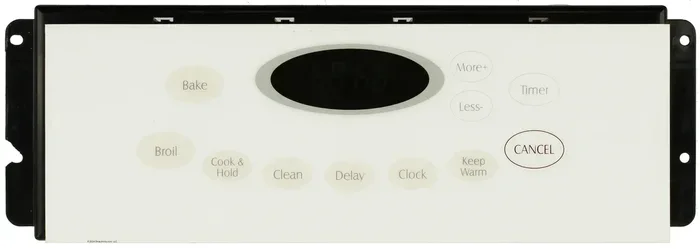
First, stand in front of your Maytag oven and look at the control panel. On most models, the control panel is located at the top of the oven door or on the front of the range. You will see a series of buttons and possibly a digital display. Take a moment to identify the Bake button and the Temperature button. These are the two buttons you will most likely need to use.
If your oven has a touchscreen interface, the buttons may appear as icons on the screen. Look for symbols that represent Bake, Temp, or Settings. On older Maytag models with physical knobs, the process is slightly different, but we will cover that below.
Step 2: Press and Hold the Bake Button
Press and hold the Bake button for about five to ten seconds. You should see the oven display change or a symbol appear on the screen. This indicates that the oven has recognized your command to exit Sabbath mode. Some Maytag models require you to hold the button for a longer period, so be patient and keep holding it until you see a response.
If nothing happens after ten seconds, release the button and try again. Make sure you are pressing the correct button. On some models, the Temp button works instead of the Bake button. Try holding the Temp button for five to ten seconds if the Bake button does not produce a result.
Step 3: Check the Display for Confirmation
After holding the button, look at the digital display or the indicator lights on your oven. When Sabbath mode is successfully turned off, you should see the normal oven interface return. The time, temperature, or mode indicator should reappear on the screen. You may also hear a single beep confirming the change.
If the display does not change, try pressing the Cancel button once and then repeating the hold process on the Bake button. Sometimes the oven needs a small reset before it will respond to the Sabbath mode exit command.
Step 4: Test the Oven Settings
Once you see the normal display return, test your oven by pressing the Bake button and setting a temperature. Try setting the oven to 350 degrees Fahrenheit and pressing Start. If the oven begins to heat up normally, you have successfully turned off Sabbath mode. If the oven still does not respond to normal commands, move on to the troubleshooting steps below.
As a quick test, you can also try turning on the oven light or using the timer function. These functions are usually disabled during Sabbath mode and should work normally once the mode is off.
Troubleshooting: Sabbath Mode Will Not Turn Off
Sometimes the steps above do not work right away. Do not worry. This happens more often than you might think, and there are several things you can try to fix the issue. Below are the most common problems and their solutions.
The Display Is Frozen or Unresponsive
If the oven display is frozen and not responding to any button presses, the first thing to try is a power reset. Turn off the oven at the circuit breaker or unplug it from the wall outlet. Wait at least thirty seconds, then plug it back in or turn the breaker back on. This hard reset clears any temporary glitches and often resolves the issue.
After the reset, check if the display returns to normal. If it does, try turning off Sabbath mode again using the steps above. A power reset gives the oven’s control panel a fresh start and can fix many minor electronic issues.
The Oven Still Will Not Respond to Commands
If the display works but the oven ignores your commands to exit Sabbath mode, try a different button combination. On some Maytag models, you need to hold the Bake and Temp buttons together for ten seconds. On others, you may need to press the Settings button first and then navigate to the Sabbath mode option using the arrow keys.
Another approach is to check your appliance manual. The manual for your specific Maytag model will have the exact steps for disabling Sabbath mode. You can usually find the manual online by searching for your model number on the Maytag website. Having the correct instructions for your exact model makes a big difference.
Child Lock Is Interfering
Some Maytag ovens activate a child lock feature alongside Sabbath mode. If the child lock is on, the oven buttons may not respond at all. To disable the child lock, look for a small lock icon on the control panel. Press and hold the lock icon button or the corresponding button combination for five seconds. Once the child lock is off, try turning off Sabbath mode again.
Quick Tip: If you are unsure whether the child lock is active, try pressing any button on the control panel. If nothing happens, the child lock is likely engaged. Unlocking it first will solve the problem.
Using Your Maytag Oven After Turning Off Sabbath Mode
Once you have successfully turned off Sabbath mode on your Maytag oven, you are ready to cook again. Your oven should now respond to all normal functions, including bake mode, broil mode, and the full range of temperature settings. Here are a few tips to make the most of your oven going forward.
Start by familiarizing yourself with the control panel layout. Know where each button is and what it does. This simple habit prevents confusion in the future. If you have guests who are unfamiliar with your oven, take a moment to show them the basic functions. This small effort saves time and frustration later.
When you are ready to cook, try a simple recipe to test everything out. A classic cauliflower steak is a great option. It requires a steady oven temperature and a predictable oven heating pattern, which makes it an excellent test of your oven’s performance after disabling Sabbath mode. Once you confirm everything works, you can confidently move on to more complex recipes.
Also, take note of your oven’s temperature control accuracy. After a power reset or a mode change, some ovens may need a few minutes to stabilize. If you notice uneven heating or temperature fluctuations, let the oven preheat for an extra five to ten minutes before placing your food inside. This small adjustment ensures consistent cooking results every time.
If you enjoy experimenting with different oven types, consider exploring how tandoori ovens work for authentic cooking styles. Understanding different oven designs helps you appreciate the technology in your Maytag appliance and use it more effectively.
Preventing Sabbath Mode From Activating Again
Once you have turned off Sabbath mode, you probably do not want it to come back unexpectedly. Here are a few simple steps to prevent accidental activation:
- Be mindful of button combinations: Avoid holding the Bake or Temp button for more than a few seconds unless you intend to change a setting.
- Lock the control panel: If you have children at home, keep the child lock engaged when you are not actively cooking.
- Note your model-specific steps: Write down the steps to turn off Sabbath mode for your specific Maytag model and keep them in a kitchen drawer.
- Check after power outages: If your oven loses power, check the settings when the power returns. A quick glance at the control panel can save you from surprises.
- Educate household members: Make sure everyone in your home knows what Sabbath mode is and how to turn it off. This prevents confusion and accidental activations.
Taking these small precautions goes a long way. You will spend less time troubleshooting and more time enjoying your kitchen appliance. If you ever need to adjust temperature settings for a specific recipe, your oven will be ready to go with all functions fully operational.
When to Contact Maytag Support
If you have tried all the steps above and Sabbath mode still will not turn off, it may be time to contact Maytag support. Persistent issues with the control panel or digital display could indicate a deeper electrical or electronic problem. Before you call, gather a few pieces of information to make the process smoother.
Have your oven model number ready. You can usually find it on a sticker inside the oven door or on the back of the unit. Note any error codes that appear on the display screen. And be ready to describe the steps you have already tried. This information helps the support team diagnose the issue quickly and recommend the right solution.
Maytag offers several ways to get help. You can call their customer service line, chat with a representative online, or schedule a service visit if needed. Most oven issues that seem serious are actually simple fixes. The support team has seen it all and will guide you through the process with patience and expertise. Remember, your oven is a valuable kitchen appliance, and getting professional help when you need it is always a smart move.
Key Takeaways
- Sabbath mode is a special setting that restricts certain oven functions for religious observance.
- To turn off Sabbath mode, hold the Bake or Temp button for five to ten seconds on your Maytag oven.
- A power reset can fix frozen displays and unresponsive buttons when standard steps do not work.
- Check your Maytag appliance manual for model-specific instructions on disabling Sabbath mode.
- The child lock feature can interfere with button presses and should be disabled first if needed.
- After turning off Sabbath mode, test your oven with a simple recipe to confirm all functions work.
- Contact Maytag support if the issue persists despite trying all troubleshooting steps.
Frequently Asked Questions
What does Sabbath mode do on a Maytag oven?
Sabbath mode disables certain oven functions to comply with religious observance rules. It turns off the audible alerts, limits the digital display, and restricts temperature control adjustments. The oven may still maintain a low heat setting, but normal cooking functions like bake mode and broil mode are temporarily disabled.
How do I know if my Maytag oven is in Sabbath mode?
You can tell if your Maytag oven is in Sabbath mode by checking the control panel and display screen. The display may be blank or show a special indicator. The oven will not beep, and buttons like Bake and Broil may not respond to normal commands. If you notice these signs, Sabbath mode is likely active.
Can I turn off Sabbath mode without the manual?
Yes, you can usually turn off Sabbath mode without the manual. Try holding the Bake button or the Temp button for five to ten seconds. If that does not work, try pressing both buttons together. A power reset by unplugging the oven for thirty seconds can also help. If these steps fail, search for your model number online to find specific instructions.
Why does my Maytag oven keep going into Sabbath mode?
This usually happens after a power outage or electrical surge. The oven may reset to its default settings, including Sabbath mode. It can also occur if someone accidentally presses the right button combination. Check your oven settings after any power interruption to make sure the mode is off.
Is it safe to use the oven while Sabbath mode is on?
Yes, it is generally safe. Sabbath mode is designed to maintain a low, steady oven heating level without allowing the user to adjust settings actively. The oven will not overheat or malfunction. However, you cannot use full cooking functions until you turn off Sabbath mode. Always refer to your appliance manual for specific safety guidelines.
How long does it take to turn off Sabbath mode on a Maytag oven?
The process usually takes less than one minute. Holding the Bake or Temp button for five to ten seconds should do the trick. If the control panel is unresponsive, a power reset may add another minute or two. In most cases, you will have your oven back to normal operation very quickly.
Conclusion
Turning off Sabbath mode on your Maytag oven does not have to be a frustrating experience. With the right steps and a little patience, you can restore full functionality to your oven in just a few minutes. Remember to start with the simple method: hold the Bake or Temp button for five to ten seconds. If that does not work, try a power reset or check for a child lock that might be interfering.
Understanding how your kitchen appliance works gives you confidence in the kitchen. You will spend less time troubleshooting and more time cooking meals you love. Whether you are baking a simple dish or trying something new, your Maytag oven is ready to perform at its best once Sabbath mode is off.
Keep this guide bookmarked for future reference. Share it with household members so everyone knows how to handle the situation. And if you ever run into an issue that none of these steps fix, do not hesitate to reach out to Maytag support. They are there to help you get the most out of your oven. Happy cooking!